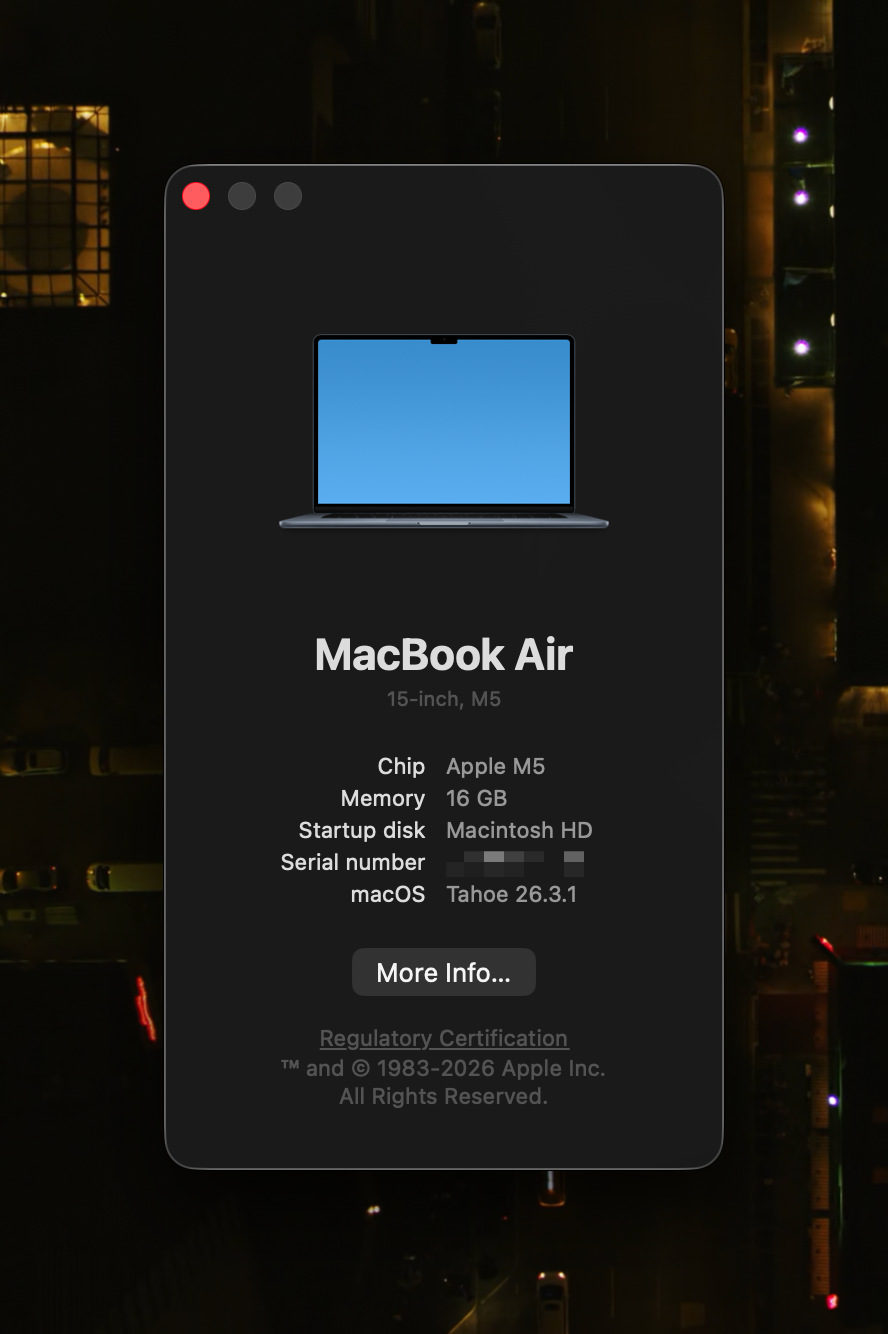
I bought the base model M5 MacBook Air 15-inch. 16GB of unified memory, 512GB of storage. No upgrades, no build-to-order options. This is a review of that machine, and the short version is this: you are buying the best laptop in its price range. Stop worrying about performance. You have more than enough. Reviewers will show you benchmark comparisons because that's their job, and the charts will show the M5 is faster than the M4, because it is. But that difference stopped being meaningful a generation ago. The performance was already more than anyone needed with the M4. Everything after that is just a bigger number.
This review is about everything else.
The Benchmark Trap
Do you remember the Ryzen 9 5950X? AMD's flagship desktop processor from 2020. Sixteen cores, 105W TDP, paired with beefy tower coolers or 360mm liquid cooling. It dominated everything for two years straight. Nobody called it slow then, and it still isn't. That chip scores around 2,207 single-core and 12,014 multi-core in Geekbench 6.
The M4 Mac Mini, a $499 box the size of a paperback, posts a single-core score of 3,787 and multi-core of 14,692. Already well ahead of the 5950X on both counts, drawing a fraction of the power from a machine you can hold in one hand.
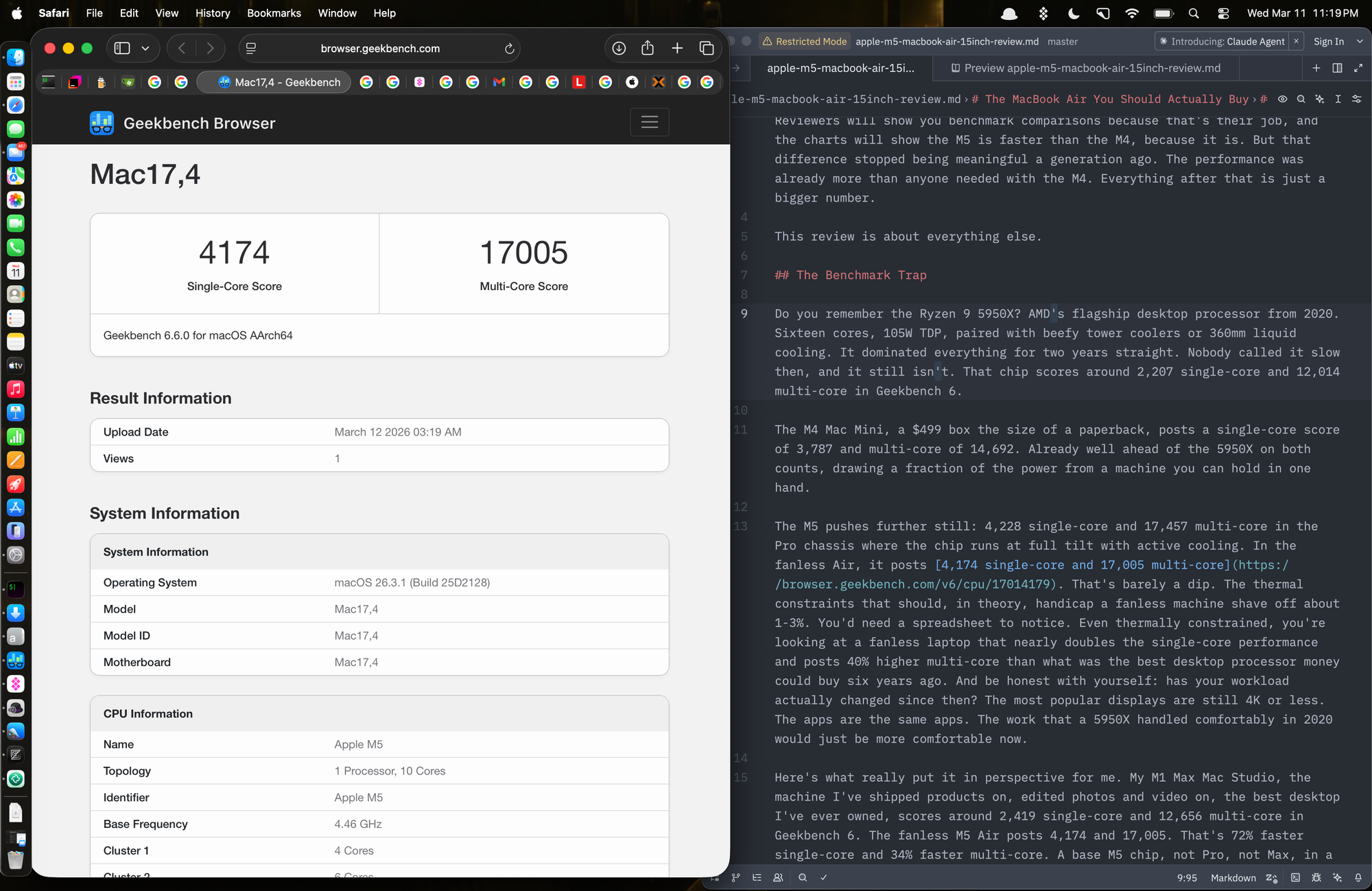
The M5 pushes further still: 4,228 single-core and 17,457 multi-core in the Pro chassis where the chip runs at full tilt with active cooling. In this fanless 15-inch Air, it posts 4,174 single-core and 17,005 multi-core.
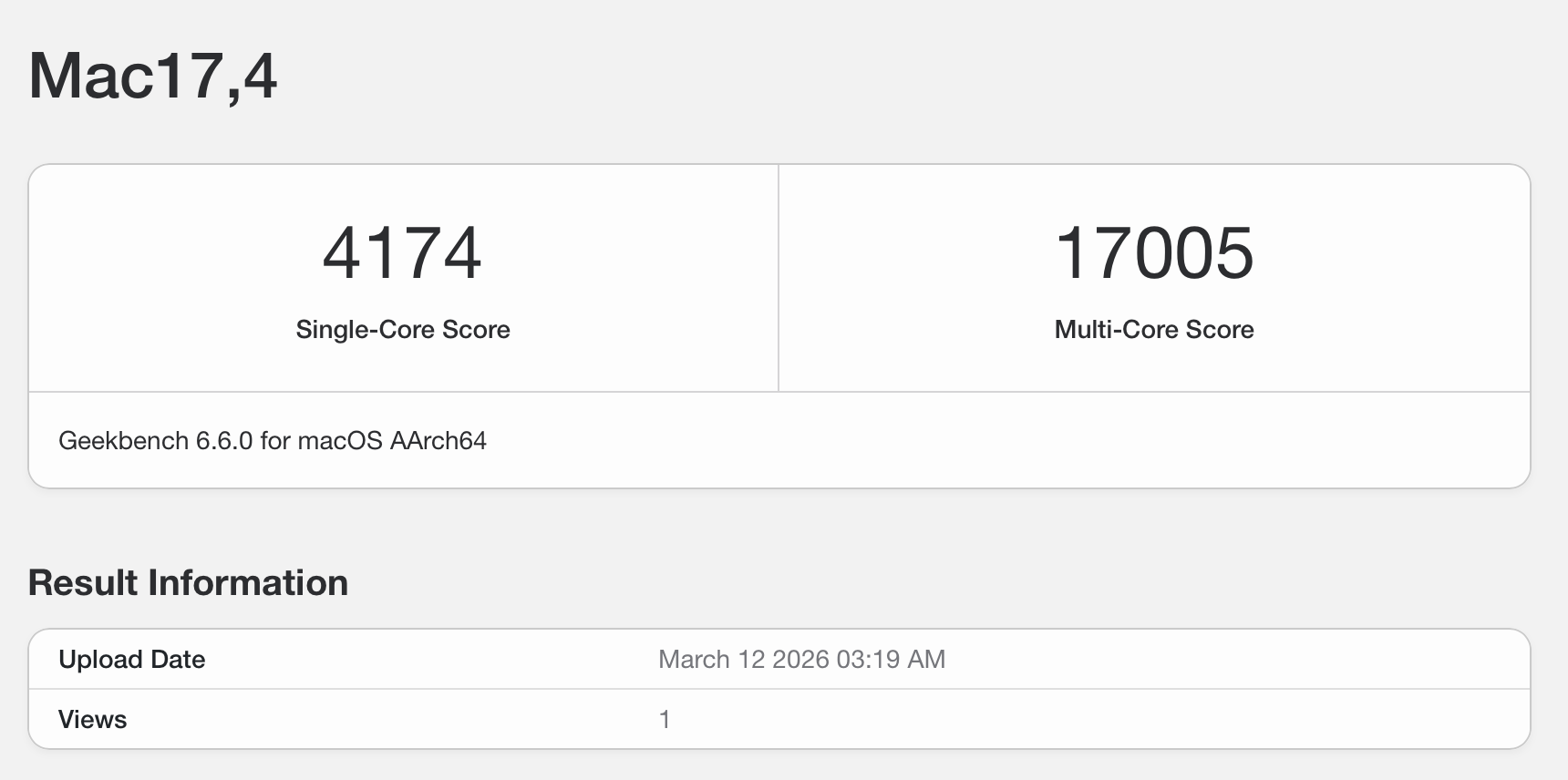
That's barely a dip. The thermal constraints that should, in theory, handicap a fanless machine shave off about 1-3%. You'd need a spreadsheet to notice. Even thermally constrained, you're looking at a fanless laptop that nearly doubles the single-core performance and posts 40% higher multi-core than what was the best desktop processor money could buy six years ago. And be honest with yourself: has your workload actually changed since then? The most popular displays are still 4K or less. The apps are the same apps. The work that a 5950X handled comfortably in 2020 would just be more comfortable now.
Here's what really put it in perspective for me. My M1 Max Mac Studio, the machine I've written code, prototyped 3D models, edited photos and video on, arguably the best desktop I've ever owned, scores around 2,419 single-core and 12,656 multi-core in Geekbench 6. The fanless M5 Air posts 4,174 and 17,005. That's 72% faster single-core and 34% faster multi-core. A base M5 chip, not Pro, not Max, in a fanless ultrabook, is outperforming the M1 Max in a Studio with active cooling. The GPU is a different story - I'm not mad enough to expect a fanless design to match a dual-fan Max silicon in graphics-intensive work - but for CPU performance, the Air has already lapped it.
That's the CPU side. The GPU comparison against the M1 Max favors the Max, as it should, but measured against the Windows competition, the Air is in a league of its own. The M5's integrated graphics score around 48,000 in OpenCL. The AMD Radeon 780M, which was the most powerful integrated GPU in the Windows world before Intel Panther Lake, tops out around 30,000. The Air's GPU is over 60% faster than the best iGPU Windows laptops could offer. Not a discrete GPU in a thick gaming laptop with a charging brick the size of a paperback. The integrated graphics in a fanless ultrabook. For photo editing, casual video work, UI compositing, and the occasional gaming, the Air has more GPU headroom than any Windows laptop without a dedicated graphics card. This isn't even a close contest.
So when a reviewer spends four thirds their video showing you that the M5 scores higher than the M4, ask yourself: compared to what baseline? You're already past the point where performance is the bottleneck. The 5950X proved that years ago. The performance conversation has been over for a while now.
Let's talk about the things you actually feel.
Silence
Have you ever looked at Apple's spec sheet for the MacBook Air? CPU, GPU, memory, storage, display, battery life, weight, dimensions. Everything you'd expect. One thing conspicuously absent: operating noise.
Every Windows laptop lists it. "37 dBA at idle, 42 under load." Reviewers break out decibel meters, compare fan curves, debate which ultrabooks get "distractingly loud" versus merely "noticeable." There's an entire category of laptop evaluation built around how much noise your computer makes while you're trying to think.
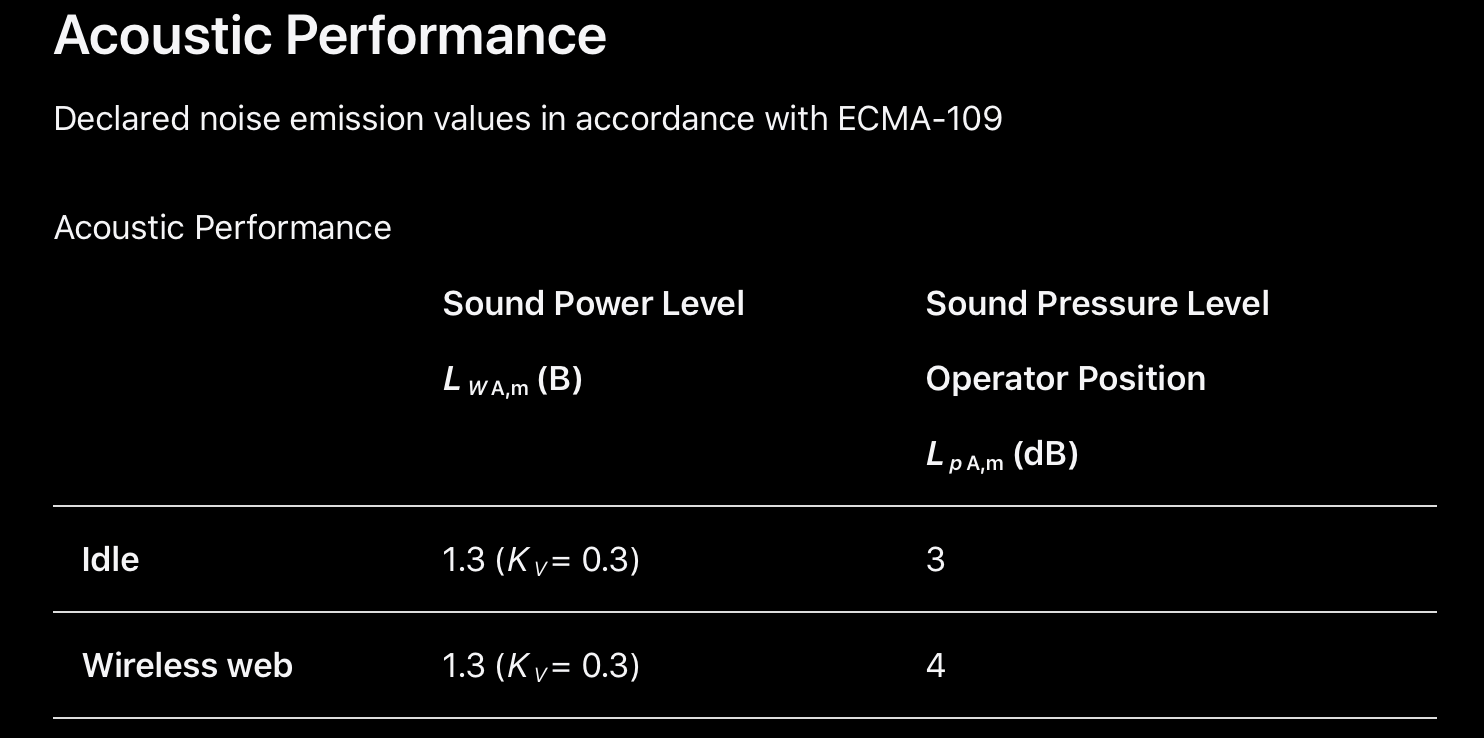
The MacBook Air doesn't have a noise spec on its specs page because there's nothing meaningful to report. No fan. No moving parts. If you dig into Apple's regulatory compliance documents, you'll find an ECMA-109 acoustic performance page that reports 3-4 dB sound pressure at the operator position. For reference, a quiet library is 30-40 dB. A whisper is 20-30 dB. The Air registers at a level so close to zero that the only reason it isn't zero is because electronics aren't perfectly silent: voltage regulators, capacitors, and display backlights produce the faintest electrical hum that no human ear would ever pick up in any real environment. Apple measured it honestly in an anechoic chamber and reported what the instruments found. Listing that number on the specs page next to "18 hours battery life" and "1.51 kg" would look like a typo.
You notice this absence of noise in moments that no benchmark captures. You're on a call and your laptop isn't bleeding fan noise into the microphone. You're working late and the person next to you doesn't know the machine is on. You're in a library, a lecture hall, a quiet conference room, and the only sound is your typing. Every Windows laptop in the room has a fan waiting to spin up the moment someone opens a few too many browser tabs or joins a video call. The Air just sits there, doing its work, saying nothing.
And remember: this silence isn't costing you performance. This is the same machine that outpaces a Ryzen 9 5950X in both single-threaded and multi-threaded work. It throttles under sustained load, sure. It's still fast when it does. You give up a few percentage points of peak sustained throughput that you'd never notice in daily use, and in return you get a machine that never, ever makes a sound.
Where I'm Coming From
My last MacBook was a 2019 MacBook Pro 16-inch. Intel Core i9, 16GB of RAM, Radeon Pro 5500M. It cost me nearly three thousand dollars. A little over a year later, Apple dropped Apple Silicon and I was too slow to recognize how significant that shift really was. That Intel machine ran hot constantly, thermal-throttled under any sustained workload, and the fans got loud enough to be distracting on calls. It is probably the worst experience I've ever had with an Apple product. I was not proud of that purchase.
When the M1 Max Mac Studio came out, I sold the MacBook Pro immediately and bought the Studio instead. I was convinced I needed 32GB of RAM because the 16GB MacBook Pro had been painfully slow at times. I won't go into detail about the Studio experience here. Like I have previously stated, It is probably the best desktop computer I've ever used. I shipped many products on that machine, participated in large projects, built a side career and this blog. It handles everything I throw at it, including Blender, Fusion 360, hobbyist photography with Darktable and the occasional wedding video for friends and family with Final Cut Pro. The Studio gave me enough confidence that any Mac with matching processing power wouldn't slow me down. And probably wouldn't slow you down either.
You might ask: if you already have a Mac you're satisfied with, why bother buying another one? Because I was still using a Windows ThinkPad T14 when I was away from my desk. And I'd had enough. The battery life, the fan noise, the 16:9 screen, Windows itself. Every time I had to use it, these were the things I couldn't stop thinking about. The ThinkPad isn't a bad machine - it genuinely isn't. It's just that daily use of the Mac Studio had recalibrated what I considered normal. Little inconveniences I used to ignore started feeling like friction. If you've never spent time with an Apple Silicon Mac, you probably wouldn't understand. I didn't, until the Studio made it impossible to go back.
The Case for 15 Inches
The ThinkPad T14 Gen 2 AMD - Ryzen 7 Pro 5850U, upgraded to 32GB of RAM - was a genuinely good Windows/Linux machine. I had no complaints about the performance, the keyboard, the build quality, or Linux support. My one complaint was the screen and the perpetual outlet hunting.
Fourteen inches at 16:9 with 1920x1080 sounds reasonable on paper. In practice, it means you're constantly choosing between your browser and your terminal. You can tile them side by side, but each window gets so narrow that code wraps awkwardly and web pages collapse into mobile layouts. So you Alt-Tab instead, and Alt-Tabbing is not multitasking. It's rapid context switching, which is a fundamentally different cognitive activity. Every switch costs you a beat. You lose your place. You break your train of thought. Multiply that by hundreds of times a day and you're paying a tax you don't even notice because you've been paying it for years.
Then there's the vertical space. 16:9 was designed for watching movies, not reading text. On a 14-inch 1080p panel, you get 1080 vertical pixels. Subtract the Windows taskbar at the bottom, which is pinned there permanently because Microsoft decided that's where it belongs and you can't move it to the side. Subtract the browser tab bar, the address bar, the bookmarks bar. Subtract the terminal title bar and status line. What you're left with is a viewport that shows maybe 30-40 lines of text in each window. That's nothing. You're scrolling constantly, which is just a different flavor of context switching.
The MacBook Air's 15.3-inch display at 16:10 changes the math in two ways that compound on each other.
First, the extra 1.3 inches of diagonal don't sound like much, but screen area scales geometrically. You get meaningfully wider windows when tiling side by side. A browser and a terminal can sit next to each other and both have enough horizontal room to be fully usable. Code doesn't wrap. Web pages render in their desktop layout. You can actually read both at the same time, which is the whole point.
Second, 16:10 gives you more vertical pixels per inch of screen width than 16:9. It's roughly 10% more vertical space, which translates directly to more lines of visible text. And on macOS, you can tuck the Dock to the side of the screen or set it to auto-hide, reclaiming every pixel at the bottom edge for actual content. The result is that each window shows noticeably more lines of text than the same application on the ThinkPad did. You scroll less, and more of your work is visible at any given moment.
This is not a spec sheet difference. Once you've worked on the larger 16:10 panel for a few days, going back to 14-inch 16:9 feels physically constraining, like someone shrunk your desk.
A note on the 13-inch Air. For $200 less, you get the same M5 chip with the same performance ceiling. But the 15.3-inch display has roughly 26% more screen area than the 13.6-inch (about 106 square inches versus 84). You also get two extra GPU cores and a larger chassis that helps with heat dissipation. The weight difference is 0.6 pounds - about a can of soda. I don't think that's a meaningful penalty for 26% more usable screen.
The advantage of the bigger screen is immediate and constant. More visible lines of code, more comfortable split-screen, less scrolling. You feel it every time you look at the display. The weight difference, you forget about the moment you set the laptop down.
Here's my contrarian take on who should buy the 13-inch: it's not the person who works on the go and stares at the built-in screen all day. That person benefits the most from the extra real estate and should get the 15. The 13-inch is for someone who has a large external display at the office and another one at home, and only uses the laptop screen while carrying it between the two. If the built-in display is just a transition screen between two docks, then sure, save the $200 and the half pound. For everyone else, the 15-inch is the one to get.
Pick It Up
The MacBook Air 15 weighs 3.3 pounds. My ThinkPad T14 also weighed 3.3 pounds. Same number, completely different experience.
The T14's 50Wh battery and the Ryzen 7 Pro's power draw meant I was carrying the 65W USB-C charger everywhere. The brick, the cable, the act of hunting for an outlet, the awareness that you need to be near one. Add the charger and you're closer to 4.5 pounds of actual carry weight, plus the mental overhead of battery anxiety.
The Air's 66.5Wh battery paired with the M5's efficiency gets up to 18 hours of rated battery life and around 15 hours of real web browsing. That's a full working day with margin to spare. I don't carry the charger anymore. I just don't. I leave the house with the laptop and come back and it still has charge. The carry weight didn't change on the spec sheet, but in reality I dropped over a pound because the charger stays home.
And on the days I do need a top-up, any small GaN USB-C charger will do. A 30W brick the size of a matchbox that also charges my phone. One charger, one cable, both devices. The ThinkPad's 65W adapter is USB-C too, so it's not single-purpose, but it's still a bigger and heavier brick that I carried specifically for the laptop. The whole charging situation just got simpler.
The total weight I actually carry out the door dropped by over a pound, even though the laptop itself weighs the same.
It Just Wakes Up
The first evening I had the Air, it arrived around dinner time. I went through the initial setup, closed the lid, and went to make dinner. After eating, I came back, opened the lid, and the machine was just there. Instantly. Lock screen up, Touch ID waiting. I wasn't ready for it. It genuinely caught me off guard.
That reaction tells you everything about what Windows laptops have trained us to expect.
I had my ThinkPad T14 set to hibernate on lid close. Not sleep. Hibernate. Because Windows laptops don't sleep right. Modern Standby is a well-documented disaster: machines wake in bags, batteries drain overnight, fans spin up at 2 AM for no discernible reason. The community workaround is the same one it's been for years: just hibernate. So I did, like everyone else, and I internalized the cost. Open the lid, sit upright, wait 15 to 30 seconds while the machine reads its memory image back from the SSD, watch the BIOS splash, watch the Windows lock screen fade in, type the password, wait for the desktop to finish loading. That became muscle memory. I stopped thinking of it as slow because I forgot what fast looked like.
The Air doesn't hibernate. It doesn't need to. Apple's silicon sips so little power in sleep that the battery barely moves overnight. When you open the lid, the display is on before your eyes finish adjusting. There's no boot sequence, no BIOS splash, no loading phase. It's just on, right where you left it, as if no time has passed.
Here's the part that surprised me: this is faster than my Mac Studio. The Studio is plugged into a Dell monitor, and when the system wakes from sleep, I have to wait for the monitor to come out of its own sleep state, detect the signal, and switch inputs. That handshake takes a few seconds. It's not slow, but it's noticeable. The Air has no external display handshake. The screen is built in, controlled directly by the SoC, and it wakes at the speed of the hardware, which is effectively instant.
It sounds trivial. It isn't. You open and close your laptop dozens of times a day. With the ThinkPad, every one of those was a small interruption I'd learned to sit through. With the Air, I stopped noticing the act of opening my laptop at all.
Faster Than Your Ethernet
The M5 MacBook Air ships with Wi-Fi 7 via Apple's new N1 wireless chip. Previous models topped out at Wi-Fi 6E, which was already fast. Apple could have left it there and nobody would have complained. They didn't.
Using my Ubiquiti UniFi Dream Router 7, at about 16 feet away with line of sight, iperf3 measured 1.18 Gbit/s. Sustained, consistent, across a 10-second test window.
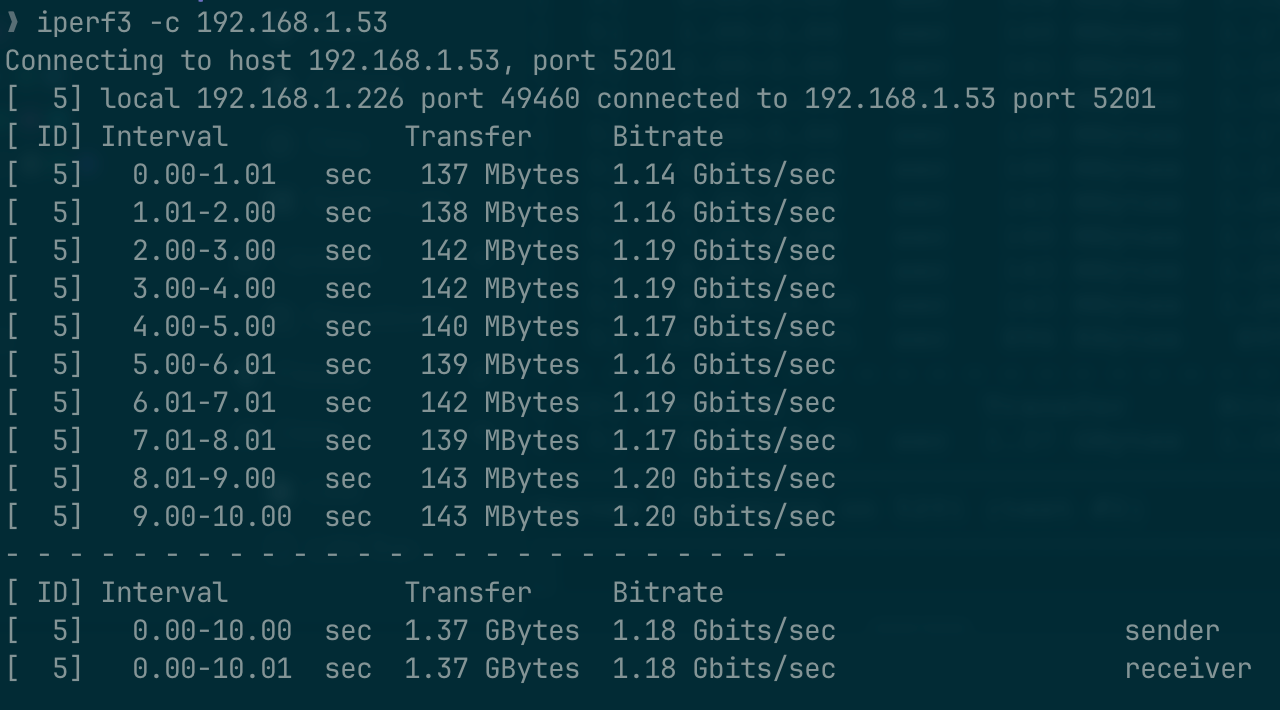
Every single one-second interval landed between 1.14 and 1.20 Gbit/s. That's not a burst. That's a flat line at gigabit-plus speeds over the air.
To put that in perspective: most people's wired Ethernet is 1 Gbit/s. The Air's Wi-Fi connection is faster than the Ethernet port that most laptops ship with, including the ThinkPad T14 I came from. A laptop with no Ethernet jack is now outpacing the wired connections on laptops that have one.
This matters for the kind of work I do. Pulling container images, transferring VM snapshots, syncing large repositories, downloading datasets. These are tasks where network throughput is the bottleneck, and the bottleneck just got wider than a cable. I'm not saying Wi-Fi 7 replaces a wired connection in every scenario. Latency and congestion still favor Ethernet in dense environments. But for a laptop that you carry around the house or the office, connected to a capable router, the speed penalty for being wireless has effectively disappeared.
If your office is stuck on Wi-Fi 6 or below and there's an Ethernet jack at your desk, consider a Thunderbolt or USB-C dock. Most of them provide at least Gigabit Ethernet, and higher-end models come with 2.5GbE, which a 10Gbps USB-C connection can easily accommodate. You also get keyboard, mouse, and external monitor connectivity through HDMI or DisplayPort, all through a single cable. Plug in one connector and you have a full desktop setup. Unplug it and you're back to a portable laptop with Wi-Fi faster than most people's wired connections. It's a good setup either way.
The Ecosystem Compound Effect
I signed into my Apple ID. That was it.
My passwords were there. My notes were there. My Wi-Fi credentials, my Safari tabs, my Messages history, my calendar, my contacts. The Mac Studio I use at my desk already had all of this, so the Air just pulled it down and matched it. No migration tool, no export-import dance, no "sync your data from your old device" wizard. I signed in, and the machine became mine.
This sounds like a small thing until you remember what the alternative looks like. Setting up a new Windows laptop means reinstalling your password manager and logging into it, setting up your browser and syncing it separately, configuring your email client, re-downloading your cloud storage app, reconnecting your Bluetooth devices one by one, and spending an afternoon getting everything back to where it was. Each of those steps works. None of them are hard. But there are a dozen of them, and each one is a separate system with its own account and its own sync logic.
Apple's version isn't better because any individual piece is more capable. iCloud Keychain isn't a better password manager than Bitwarden. Apple Notes isn't a better note-taking app than Obsidian. The advantage is that they're all the same account. One sign-in propagates everything at once. Your Apple ID already knows what you have.
This extends to the devices around the laptop. My iPhone was already paired with my Apple ID, so the Air recognized it immediately. My Apple Watch unlocks the laptop when I open the lid, no password needed. AirDrop moves files between the phone, the Studio, and laptop without touching a cable or extra cloud service. Universal Clipboard lets me copy text on one device and paste it on another. None of these features are new or surprising. What's notable is that I didn't configure any of them. They were just on, because everything is signed into the same account.
The compound effect is real and it's hard to appreciate from outside the ecosystem. Each individual feature has a third-party equivalent that arguably does more. But the integration between them, the fact that they all just work together without any setup, creates a friction-free experience that no collection of best-in-class individual tools can replicate. It's the kind of thing you take for granted until you have to set up a non-Apple device and remember how many separate pieces there actually are.
Who Is This Actually For? (Everyone.)
Let me describe a typical workday of mine. I have dozens of browser tabs open: API references, Grafana dashboards, Proxmox consoles, SaaS admin panels. A Docker Compose stack running locally with whatever I'm prototyping that week. Three or four IDEs for different projects. A PDF viewer with documentation. An email client. Slack. Several terminal sessions SSH'd into different servers that I switch to at a moment's notice when a monitoring tab shows something that doesn't look right.
None of this is heavy in the way that video encoding or 3D rendering is heavy. No single application is pegging the CPU. But it's a workload with a wide footprint: lots of applications loaded into memory simultaneously, lots of rapid switching between contexts, lots of moments where the system needs to respond instantly because I'm reacting to something in real time. This is exactly the kind of work that benefits from high single-core performance and good memory management, which happen to be the two things Apple Silicon and macOS do better than anything else in this form factor.
I also don't close tabs. I use multiple browsers. It is not uncommon for me to have 30+ tabs open in both Safari and Chrome simultaneously, alongside everything else. This is normal for me on my 32GB M1 Max Mac Studio, so I expected the 16GB MacBook Air to struggle with it. I was bracing for tab reloads, swap pressure, the general sluggishness that comes when you ask a machine to hold more in memory than it comfortably can.
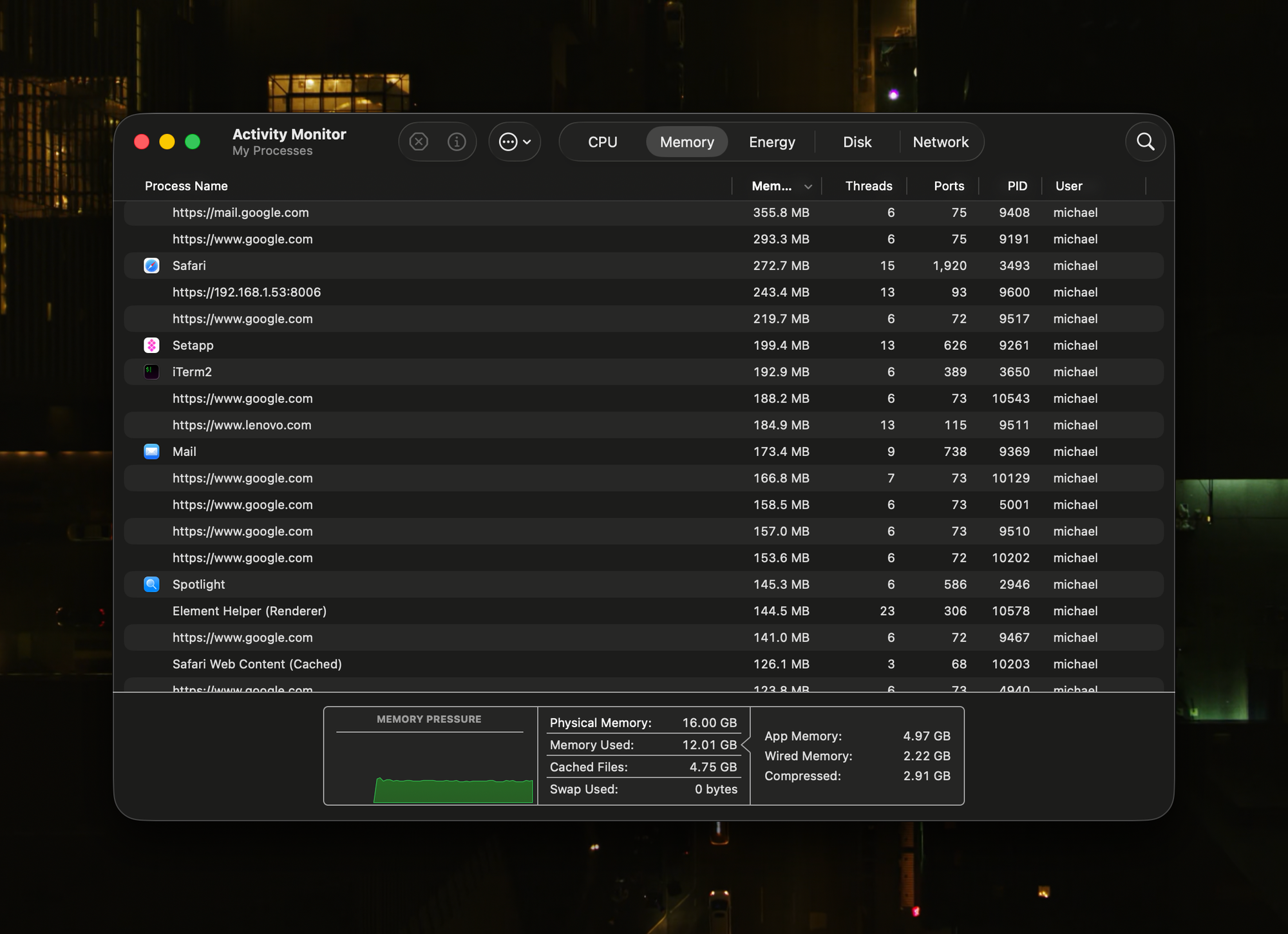
It didn't happen. The Air handles all of this without hesitation. Everything stays responsive. Tabs I haven't touched in an hour don't reload when I switch back to them. The apps I left twenty minutes ago are exactly where I left them, no redraw, no spinner. macOS memory compression and the unified memory architecture are doing serious work behind the scenes to make 16GB behave like considerably more. On the ThinkPad with 32GB of DDR4, Windows would still occasionally stutter when switching between heavy contexts, not because it ran out of memory, but because the OS wasn't as aggressive about keeping things warm. Sixteen gigabytes on this machine genuinely goes further than thirty-two did on that one.
This is the argument for "everyone." My workload sounds specialized, but the pattern is universal. Students have a dozen research tabs, a word processor, a citation manager, Zoom, and Spotify running simultaneously. Office workers live in email, spreadsheets, a handful of SaaS tools, and video calls. Creative professionals bounce between Lightroom, a browser for references, and Figma. The common thread is not raw computational demand. It's having a lot of things open and needing all of them to feel fast when you switch to them.
What I'd Change
Two things.
The ports are still Thunderbolt 4. The M5 Pro and Max machines got Thunderbolt 5, which doubles bandwidth to 80 Gbps and supports higher-resolution external displays at higher refresh rates. The Air didn't get it. For a machine Apple is positioning to last years, shipping with last generation's port standard feels like a missed opportunity, especially when the dock ecosystem is already moving to Thunderbolt 5.
The display is still 60Hz. I don't use high refresh rate monitors at my desk, so I can't say this bothers me in daily use. But I've used 120Hz on my iPhone and iPad, and the smoothness of scrolling and animations is immediately noticeable. ProMotion on the Air would have been a genuine upgrade to the experience of using this machine, not a spec sheet bullet point. Apple clearly reserves it for the Pro lineup to maintain differentiation, but at some point the Air's display starts feeling behind the rest of the Apple ecosystem you're carrying around. That point might already be here.
Neither of these is a dealbreaker. I bought the machine knowing both. But they're the two things that would make the next generation feel like a meaningful step forward rather than another incremental chip bump. Would I upgrade to another Air if they put a 120Hz screen on it? Not necessary, but I know damn well that my next Air would be equipped with a 120Hz screen.
Closing Thoughts
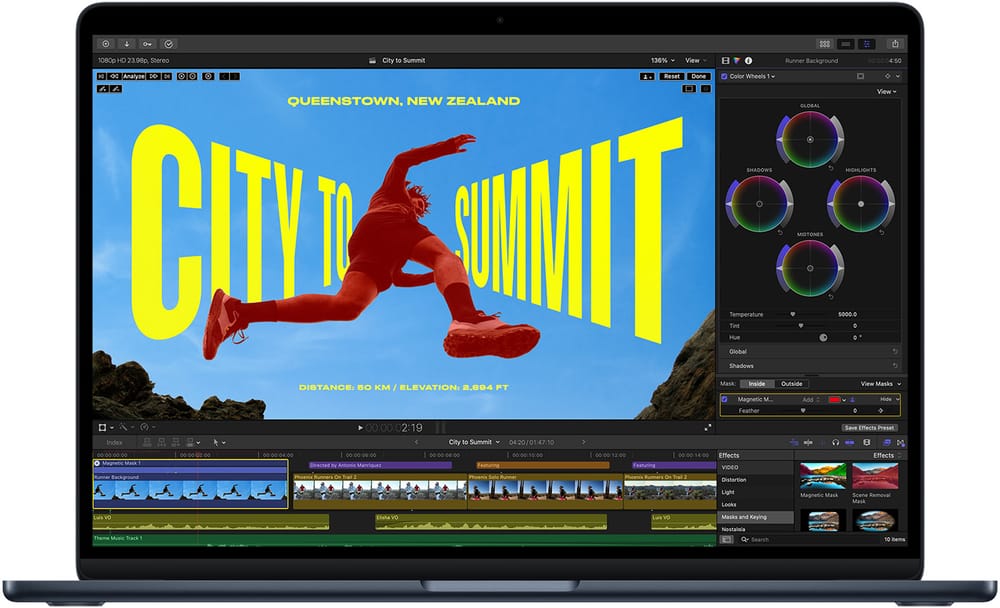
A disclaimer to the future directors out there: I don't make videos often. The fact that this is a written blog and not a YouTube channel should tell you something about how I work. I prefer typing to speaking, photos to video. So I can't tell you whether this machine will handle your million-subscriber YouTube workflow with multi-cam 4K timelines in Final Cut. But if that's your workload, you already know you want a MacBook Pro, and you're not reading MacBook Air reviews to decide.
For everyone else - and that really is almost everyone else - just head on over to the nearest Apple Store, pick up a 15 inch base M5 MacBook Air - It's just the laptop you should buy.
M5 MacBook Air Review - The Laptop You Should Actually Buy
by u/floydhwung in mctk
Join our discussion on Reddit